























Rogue M2 Monitor – Benutzerhandbuch

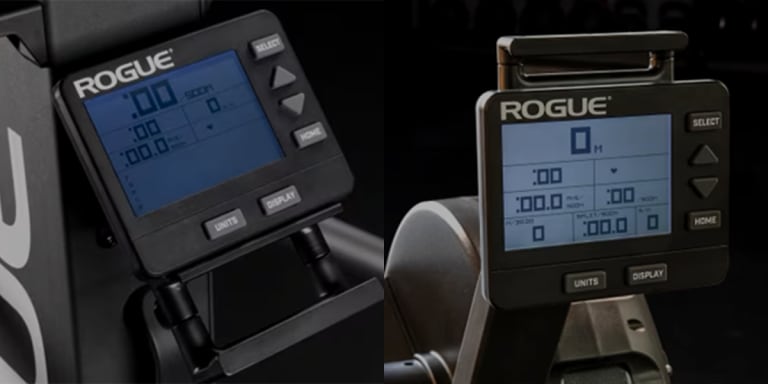
Mit dem Rogue M2 Performance Monitor haben Sie die Daten jeder Trainingseinheit immer griffbereit. Ganz gleich, ob Sie intensiv trainieren, sich auf eine lange Ausdauereinheit einstellen, einen Benchmark wiederholen oder Ihr Gerät mit der Rogue-App verbinden – der M2 liefert Ihnen die Informationen, die Sie benötigen, um zielgerichtet zu trainieren und Ihre Leistung im Laufe der Zeit zu messen.
Dieser Leitfaden erklärt Ihnen alles, was Sie benötigen, um Ihren M2 Monitor optimal zu nutzen – von der Ersteinrichtung und Geräteverbindungen über Trainingsprogramme und Leistungsanzeigen bis hin zu Trainingsverlauf und erweiterten Funktionen. Konfigurieren Sie Ihren Monitor, lernen Sie die verfügbaren Trainingsoptionen kennen und machen Sie sich mit den Tools vertraut, die Ihnen während und nach dem Training zur Verfügung stehen.
Der M2-Monitor wird für die Rogue Echo Rower , Echo SKI und Echo Bike verwendet. Obwohl sich einige Funktionen je nach Gerät unterscheiden, sind die Benutzeroberfläche und die Kernfunktionen so gestaltet, dass sie ein einheitliches Trainingserlebnis auf der gesamten Echo-Plattform gewährleisten.
Um ein optimales Erlebnis zu gewährleisten, sollten Sie Ihren M2-Monitor stets auf dem neuesten Stand der Firmware halten. Firmware-Updates bieten neue Funktionen, verbessern die Leistung und beheben Fehler, sobald diese erkannt werden.
Prüfen Sie, ob die neueste Firmware für Ihr Gerät verfügbar ist:
Erste Schritte
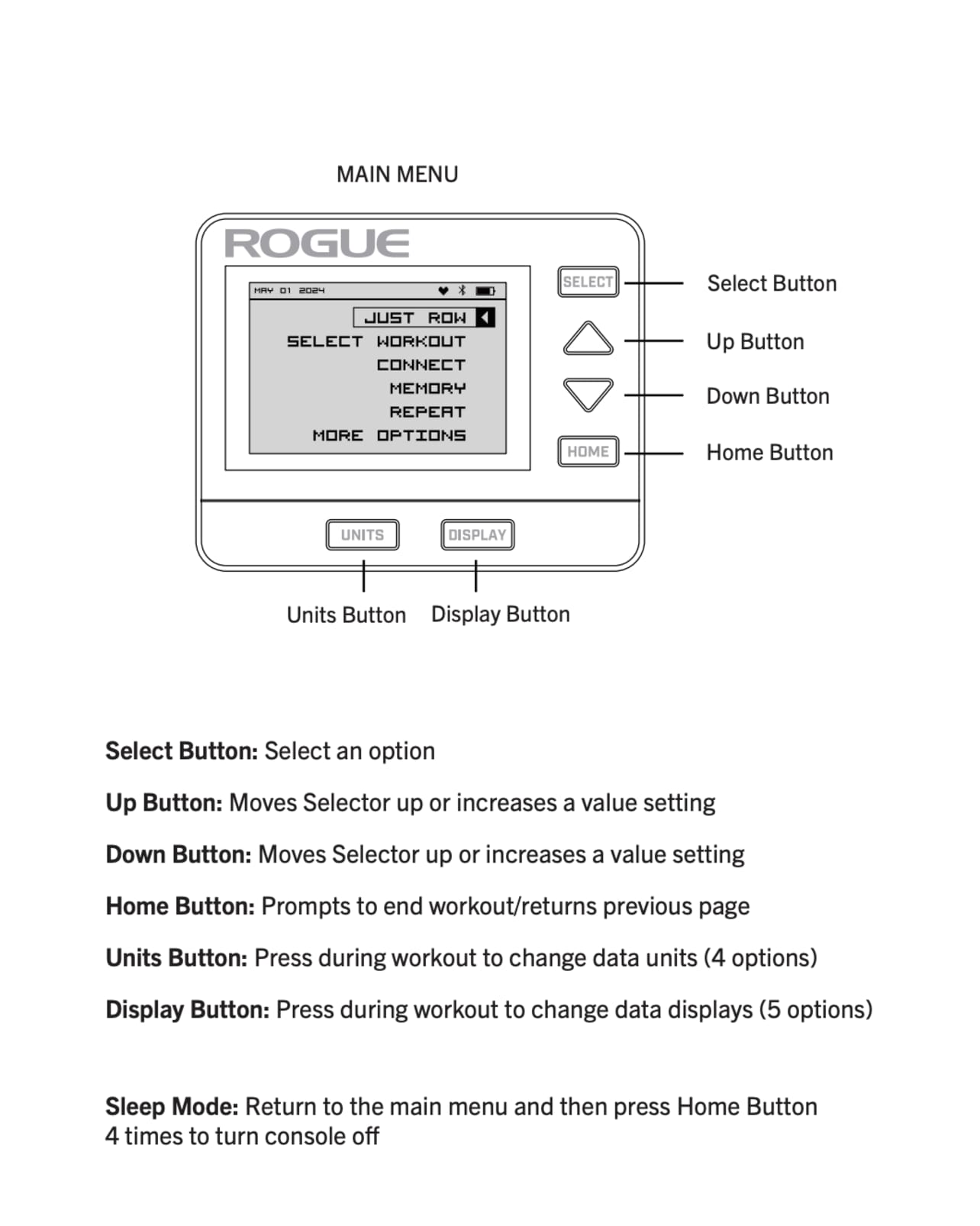
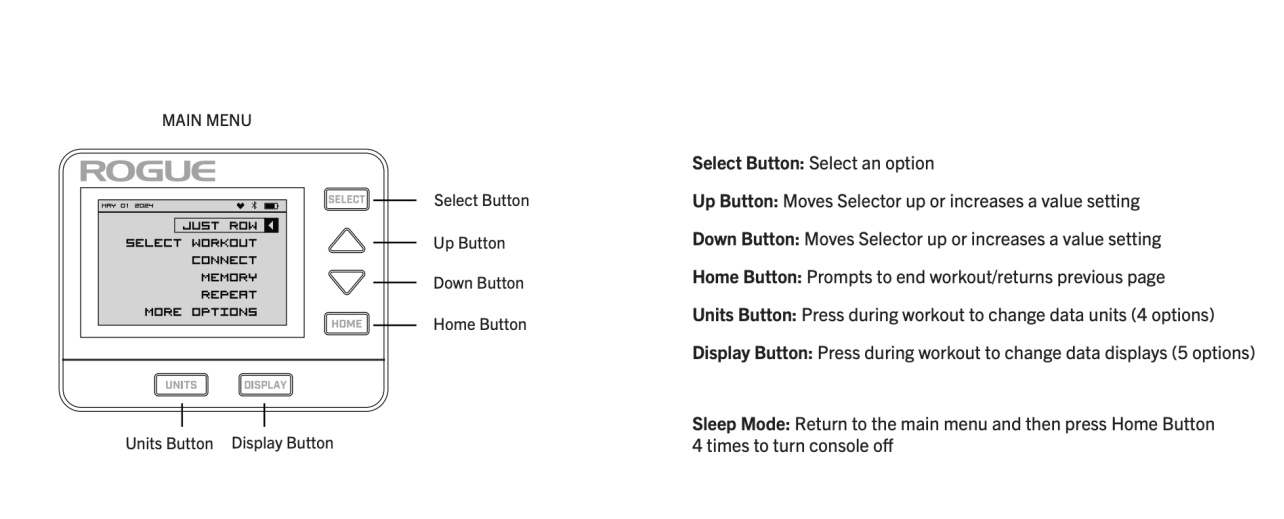
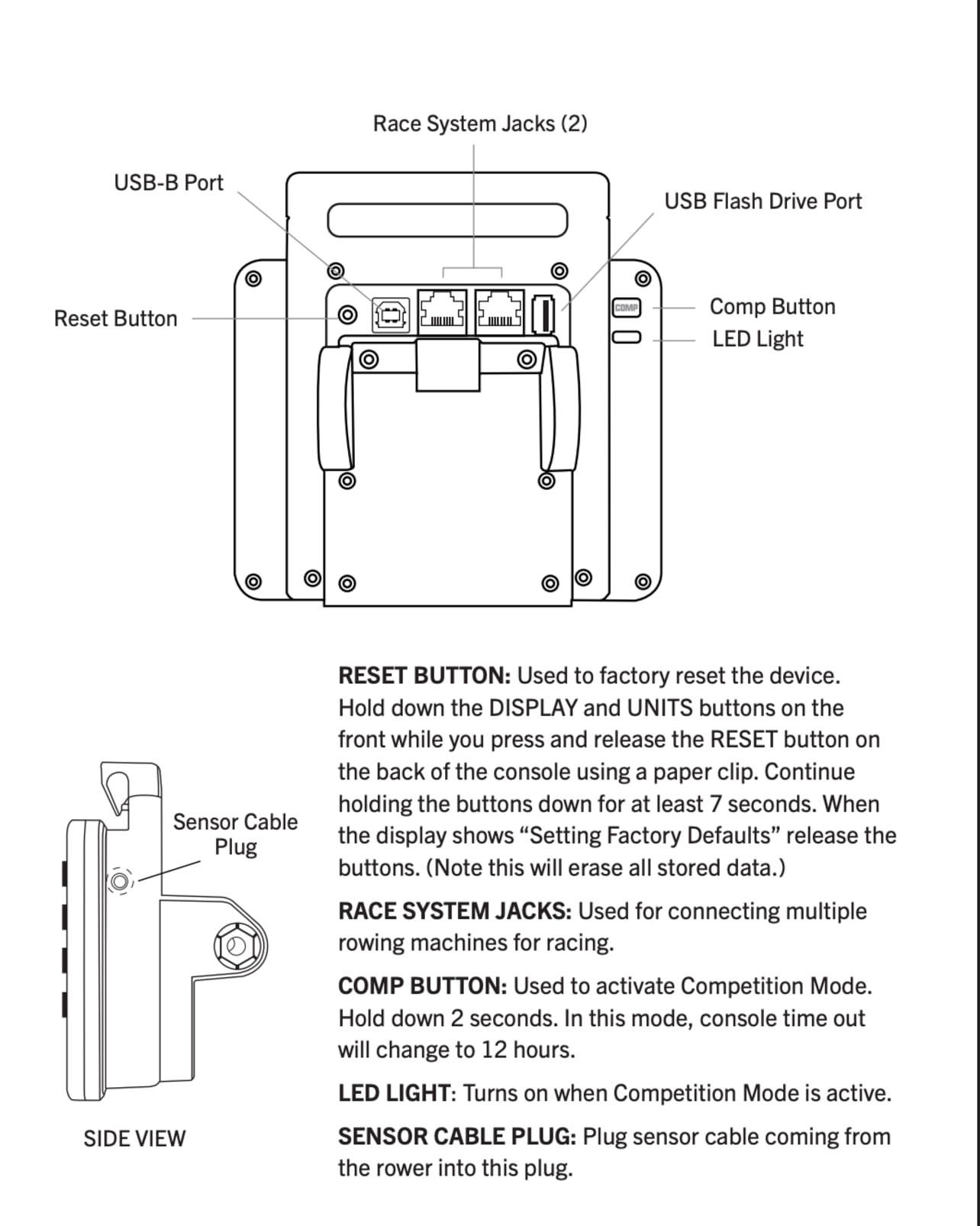
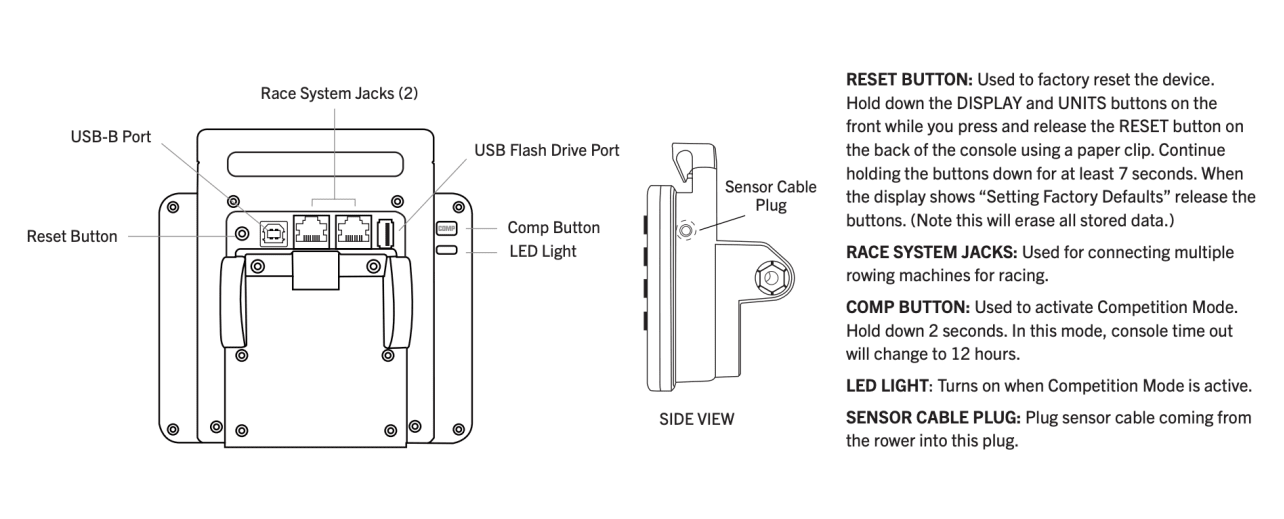
Der M2 schaltet sich automatisch ein, wenn Sie:
- Eine beliebige Taste am Monitor drückst
- Mit dem Rudern, Skifahren oder Treten beginnst
Der Monitor schaltet sich nach einer bestimmten Zeit der Inaktivität automatisch aus. Die Standard-Ruhezeit beträgt 4 Minuten und kann in den Ruhemodus-Einstellungen angepasst werden.
Im Wettkampfmodus verlängert sich das Zeitlimit auf 12 Stunden.
Um den Ruhemodus manuell über das Hauptmenü zu aktivieren, drücken Sie viermal die Home-Taste.
Stellen Sie das richtige Datum und die richtige Uhrzeit ein, damit die Trainingseinheiten korrekt im Verlauf protokolliert und mit der Rogue-App synchronisiert werden. Bereits vergangene Trainingsdaten können nicht mehr bearbeitet werden.
- Wählen Sie im Hauptmenü und dann More Options.
- Wählen Sie Utilities aus
- Wählen Sie Date and Time
- Verwenden Sie Auf/Ab um Werte anzupassen, und „Select“ um Felder zu bestätigen oder zwischen ihnen zu wechseln
- „Select“ Zum Speichern OK klicken
Für den M2-Monitor werden regelmäßig Firmware-Updates veröffentlicht, die neue Funktionen, Verbesserungen und Fehlerbehebungen beinhalten. Wir empfehlen Ihnen dringend, Ihre Firmware stets auf dem neuesten Stand zu halten, um optimale Leistung zu gewährleisten und von den aktuellsten Verbesserungen zu profitieren.
Verbinden Sie den M2 mit der Rogue App, um auf die neuesten Firmware-Funktionen und Verbesserungen zuzugreifen.
Sie die Rogue-App herunter
- Wählen Sie im Hauptmenü Weitere Optionen > Informationen > Rogue App abrufen
- Wählen Sie iOS für Apple-Geräte und Android für Android-Geräte
- Scannen Sie den QR-Code mit der Kamera Ihres Smartphones, um die Rogue-App auf Ihr Gerät herunterzuladen.
- Die Rogue-App ist außerdem hier verfügbar: im App Store und bei Google Play.
- Wählen Sie im Hauptmenü „Weitere Optionen“ > „Informationen“ > „Produkt-ID“
- Auf dem Bildschirm „Produkt-ID werden folgende Informationen angezeigt:
○ Produktmodellnummer
○ Firmware-Version
○ BLE-Version
○ Hardware-Version
○ Seriennummer
- Navigieren Sie im Hauptmenü zu „ “ > „Weitere Optionen“ > „Dienstprogramme“ > „Sprache“.
- Wählen Sie Ihre bevorzugte Sprache aus der Liste.
- Navigieren Sie im Hauptmenü zu „ “ > „Weitere Optionen“ > „Dienstprogramme“ > „Ruhemodus“.
- Wählen Sie aus der Liste die gewünschte Dauer für das Inaktivitäts-Timeout aus.
- Wählen Sie im Hauptmenü „ “ > „Weitere Optionen“ > „Dienstprogramme“ > „LCD-Kontrast“
- Wählen Sie je nach Bedarf „ “ (Pfeil nach oben) (dunkler) oder „ “ (Pfeil nach unten) (heller) aus.
- Wählen Sie im Hauptmenü „Weitere Optionen“ > „Dienstprogramme“ > „Einheiten“ aus
- Wählen Sie „Imperial“ oder „Metrisch“ als standardmäßig angezeigte Einheit aus
Verbindung zur Rogue-App, Sensoren und Geräten
Durch die Verbindung Ihres M2-Monitors mit der Rogue-App werden die Funktionen erweitert und ein vollständig vernetztes Trainingserlebnis ermöglicht. Sobald die Verbindung hergestellt ist, übermittelt der M2-Monitor Leistungsdaten in Echtzeit direkt an die Rogue-App, wodurch die manuelle Protokollierung entfällt und die langfristige Fortschrittsverfolgung vereinfacht wird. Sportler können strukturiert trainieren, ihr Tempo und ihre Leistung während jeder Einheit überwachen und Leistungstrends über mehrere Geräte hinweg über eine einheitliche Benutzeroberfläche einsehen.
- Wählen Sie im Hauptmenü „ -Verbindung“ aus.
- Wählen Sie App verbinden. Auf dem M2 wird „Bereit für die App-Verbindung“ angezeigt
- Öffnen Sie die Rogue-App auf Ihrem Mobilgerät
- Wählen Sie in der Rogue-App das Symbol „ “ (Rogue Move ) am unteren Bildschirmrand aus.
- Wählen Sie in der Rogue-App oben auf dem Bildschirm Mit dem Gerät verbinden aus.
- Die verfügbaren Verbindungen werden angezeigt. Wählen Sie die ID aus, die mit der auf Ihrem M2-Monitor angezeigten ID übereinstimmt, indem Sie Verbindung auswählen.
Sobald die Verbindung hergestellt ist, werden Sie gefragt, ob Sie sich zukünftig automatisch mit diesem Gerät verbinden möchten
Die Auto-Connect-Funktion verbindet den M2-Monitor zukünftig automatisch mit der Rogue-App, sobald der M2-Monitor eingeschaltet ist und die Rogue-App auf Ihrem Mobilgerät läuft.
Es wird empfohlen, diese Funktion auf privaten Geräten oder solchen zu nutzen, die Sie häufig verwenden. Diese Einstellung kann jederzeit in den App-Einstellungen geändert werden.
Ein kompatibler Herzfrequenzmesser (HRM) kann als Sensor mit dem M2-Monitor gekoppelt werden, um während des Trainierens Herzfrequenzdaten in Echtzeit anzuzeigen.
Befolgen Sie diese Schritte, um Ihren Brustgurt oder Ihr Armband-Herzfrequenzmessgerät mit dem M2 Monitor zu synchronisieren:
- Kompatibilität prüfen Der Rogue M2 Monitor ist sowohl mit Bluetooth- als auch mit ANT+-Herzfrequenzmessgeräten kompatibel. Dazu gehören die meisten modernen Brustgurte (wie der Polar H10 oder der Garmin HRM-Pro) sowie optische Armband-Herzfrequenzmesser. Hinweis: Wenn Sie sich bezüglich Ihres Modells nicht sicher sind, finden Sie weiter unten weitere Details zu kompatiblen Herzfrequenzmessgeräten.
- Bereiten Sie den HRM vor Legen Sie Ihren Herzfrequenzmesser an. Wenn Sie einen Brustgurt verwenden, empfiehlt es sich, die Elektrodenpads mit Wasser anzufeuchten, um einen guten elektrischen Kontakt mit Ihrer Haut zu gewährleisten.
- Wählen Sie im Hauptmenü des M2-Monitors Verbinden .
- Verwenden Sie den Pfeil nach unten um die OptionHerzfrequenz verbinden zu wählen und drücken Sie dann „Select“ .
- Der M2 beginnt nun mit der Suche nach Bluetooth- und ANT+-Signalen in der Nähe. Dieser Vorgang kann bis zu 10 Sekunden dauern.
- Sobald Ihr Herzfrequenzmesser gefunden wurde, erscheint sein Name oder seine ID auf dem M2-Bildschirm. Markieren Sie Ihr Gerät und drücken Sie „Select“ .
- Ihre aktuelle Herzfrequenz (Schläge pro Minute) wird auf dem Bildschirm angezeigt. Drücken Sie erneut auf „ Select“ , um die Auswahl zu bestätigen.
- Drücken Sie einmal die Taste „Home“, um zum Hauptmenü zurückzukehren. Wählen Sie dort den gewünschten Trainingsmodus aus. Ihre Herzfrequenz wird nun während der gesamten Trainingseinheit auf der Konsole angezeigt.
- Sobald die Verbindung hergestellt ist, erscheint oben auf dem M2-Display ein Herzsymbol.
Kompatibilität mit Herzfrequenzmessgeräten (HRM)
Der Rogue M2 Monitor ist sowohl mit Bluetooth- als auch mit ANT+-Herzfrequenzmessgeräten kompatibel.
- ANT+: Am besten geeignet für eine stabile Verbindung mit geringen Störungen.
- Bluetooth Low Energy (BLE): Standard für die meisten modernen tragbaren Sensoren.
- Tipps zur Fehlerbehebung
- Kein Signal: Stellen Sie sicher, dass der Herzfrequenzgurt fest genug auf der Haut anliegt und die Elektroden ausreichend feucht sind.
- Gerät nicht gefunden: Überprüfen Sie, ob Ihr Herzfrequenzmesser derzeit nicht mit einer anderen App oder einem anderen Gerät (z. B. einem Smartphone oder Tablet) verbunden ist, da einige ältere Bluetooth-Messgeräte nur eine Verbindung gleichzeitig zulassen.
- Batterie: Wenn das M2 den Sensor nach mehreren Versuchen nicht finden kann, muss die Batterie im Herzfrequenzgurt möglicherweise ausgetauscht werden
Wie Herzfrequenzdaten gespeichert werden
Bei Verwendung eines kompatiblen Brustgurts zur Herzfrequenzmessung erfasst der M2-Monitor die Herzfrequenzdaten wie folgt:
- Zwischenzeiten: Speichert den letzten gültigen Herzfrequenzwert, der am Ende der Zwischenzeit aufgezeichnet wurde.
- Trainingsintervalle: Speichert die letzte gültige Herzfrequenz, die am Ende des Intervalls gemessen wurde.
- Ruhephasen beim Trainieren mit variablen Intervallen: Speichert die Herzfrequenz am Ende der Ruhephase.
- Ruhephasen bei Intervalltrainings (Zeit oder Distanz): Die Herzfrequenz am Ende des Trainings wird nicht gespeichert.
Kompatible Garmin-Uhren können als Sensor mit dem M2-Monitor gekoppelt werden, um Trainingsdaten und Aktivitäten zu erfassen und in Garmin Connect zu speichern.
- Wählen Sie im M2-Hauptmenü Verbinden
- Weitere ANT+ Optionen auswählen
- Auswählen ANT+ FE-C
- Vergewissern Sie sich, dass auf Ihrem Garmin-Gerät die Option „Herzfrequenz übertragen“ aktiviert ist.
- Suchen Sie auf Ihrem Garmin-Gerät nach Sensoren und verbinden Sie diese.
- Sobald das Gerät gekoppelt ist, starten Sie eine Indoor-Rudern oder Indoor-Fahrrad -Aktivität auf dem Gerät
- Beginnen Sie das Training
- Beenden Sie nach dem Training die Aktivität auf dem Garmin-Gerät.
Firmware-Kompatibilität
Diese Funktion wird ab den folgenden Firmware-Versionen unterstützt:
Echo Bike: 30.1.36
Echo Rower: 1.1.81
Echo SKI: 20.1.70
Alle Details anzeigen und Kompatibilität mit Garmin-Uhren prüfen
Kompatible Apple Watches können als Sensor mit dem M2-Monitor gekoppelt werden, um Daten zum Trainieren und zur Aktivitätsverfolgung zu erfassen, die dann in „Apple Health“ gespeichert werden.
Wichtig: Sie müssen Ihre Uhr nicht separat koppeln.
Wenn Sie die Rogue-App auf Ihrem iPhone mit der Rudermaschine verbinden, wird gleichzeitig automatisch auch Ihre Apple Watch verbunden.
Diese doppelte Verbindung ermöglicht einen nahtlosen Datenfluss zwischen dem Monitor, Ihrem Smartphone und Ihrem Handgelenk.
- Laden Sie die Rogue-App auf Ihr iPhone herunter. (Siehe Anleitung weiter oben auf dieser Seite)
- Dadurch wird die Begleit-App automatisch auf Ihrer Apple Watch installiert.
- Starten Sie die App auf Ihrem Smartphone und stellen Sie sicher, dass Bluetooth aktiviert ist.
- Wählen Sie im Hauptmenü „ -Verbindung“ aus.
- Wählen Sie App verbinden. Auf dem M2 wird „Bereit für die App-Verbindung“ angezeigt
- Öffnen Sie die Rogue-App auf Ihrem Mobilgerät
- Wählen Sie in der Rogue-App das Symbol „ “ (Rogue Move ) am unteren Bildschirmrand aus.
- Wählen Sie in der Rogue-App oben auf dem Bildschirm Mit dem Gerät verbinden aus.
- Die verfügbaren Verbindungen werden angezeigt. Wählen Sie die ID aus, die mit der auf Ihrem M2-Monitor angezeigten ID übereinstimmt, indem Sie Verbindung auswählen.
- Sobald das Telefon verbunden ist, wird die Apple Watch-App aktiviert, die Ihre Herzfrequenz anzeigt und Ihnen ermöglicht, das Training vom Handgelenk aus zu steuern.
Eigenschaften
- Herzfrequenz-Übertragung: Ihre Uhr überträgt Ihre Herzfrequenz automatisch über die App an den M2-Monitor.
- Steuerung über die Apple Watch: Starten, unterbrechen oder beenden Sie das Trainieren direkt über die Benutzeroberfläche der Apple Watch.
- Automatische Wiederverbindung: Beim Herstellen der Verbindung werden Sie gefragt: „Dieses Gerät speichern?“
- Bei Zustimmung verbindet sich das Gerät automatisch mit Ihrem Telefon und Ihrer Uhr für zukünftige Sitzungen.
- Sie können diese Einstellungen in der Rogue-App unter „Einstellungen“ > „Apps und Geräte verwalten“ verwalten.
Firmware-Kompatibilität
Diese Funktion wird ab den folgenden Firmware-Versionen unterstützt:
Echo Rower: 1.1.84
Echo Bike: 30.1.36
Echo SKI: 20.1.73
Die Monitor-ID dient dazu, Ihren M2-Monitor bei der Herstellung einer Bluetooth-Verbindung zu identifizieren.
- Wählen Sie im Hauptmenü „ -Verbindung“ aus.
- Die Monitor-ID wird am unteren Bildschirmrand angezeigt
Hinweis: Die Monitor-ID entspricht den letzten 6 Ziffern der Seriennummer.
Trainingsoptionen und Funktionen
Es gibt drei Hauptmöglichkeiten, ein Training auf dem M2 Monitor zu starten:
- Einfach rudern / Einfach Rad fahren / Einfach Ski fahren
- Voreingestellte Trainingsprogramme, verfügbar unter Standard und Benutzerdefinierte Listen
- C: Individuelle Trainingseinheiten erstellen
Starten Sie sofort ein freies Training. Alle Daten werden aufgezeichnet und nach Abschluss im Verlauf gespeichert. Verwenden Sie “, „Display“ und „ „Units“, um die Ansichten anzupassen. Drücken Sie während des Trainings die Home-Taste, um die Aufforderung „Training beenden“ aufzurufen und das Training zu beenden bzw. zu speichern. Die voraussichtliche Endzeit zeigt eine Schätzung auf der Grundlage von 30 Minuten an.
Über Training auswählen bietet das M2 mehrere voreingestellte Optionen in den Standardliste und Benutzerdefinierte Liste .
Standardliste beinhaltet gängige Trainingseinheiten, darunter:
- 2000 m
- 5000 m
- 10.000 m
- 30 Minuten
- 500-Meter-Intervalle mit 1 Minute Pause
Die benutzerdefinierte Liste enthält neben Ihren letzten 30 Trainingseinheiten auch gängige Trainingseinheiten. (Nur Ruder-/Ski-/Radfahreinheiten sind hiervon ausgeschlossen.)
Sobald alle 30 Plätze belegt sind, werden Sie aufgefordert, ein älteres Training auszuwählen, das ersetzt werden soll, falls Sie Ihr zuletzt absolviertes Training speichern möchten.
Die festen Trainingseinheiten in dieser Liste umfassen:
- Tabata-Intervalle
- 42,195M (Marathonrudern)
- Weitere voreingestellte Intervalltrainings
Wählen Sie mit den Pfeiltasten die gewünschte Voreinstellung aus und drücken Sie anschließend „Select“, um zu beginnen.
- Wählen Sie unter Training auswählen > Neues Training Einzelzeit , Einmalige Distanz oder Einzelne Kalorien .
- Verwenden Sie die Tasten Auf / Ab , um den Zielwert (Stunden, Minuten, Sekunden, Meter oder Kalorien) einzustellen.
- Verwenden Sie die Tasten Units / Display , um den Cursor nach links oder rechts zu bewegen und durch alle Einstellungen zu blättern.
- Drücken Sie „Select “, um zu bestätigen und das Training zu starten.
Einzeldistanz-
Bei einem Einzeldistanz-Training können Sie eine Zielstrecke festlegen, beispielsweise 500 m, 5.000 m oder 10.000 m, und trainieren, bis diese Strecke zurückgelegt ist. Während des Trainings zählt der Monitor die verbleibenden Meter herunter und zeigt nach Beendigung die Endzeit auf die Zehntelsekunde genau an.
Zeitpunkt
“ Bei einem Zeitpunkt Training können Sie eine Zieldauer festlegen, beispielsweise 30 Minuten oder 1 Stunde, und trainieren, bis die programmierte Zeit abgelaufen ist. Während des Trainings zählt der Monitor die verbleibende Zeit herunter und zeigt am Ende Ihre Gesamtstrecke an.
Einzelkalorien-
Bei einem Einzelkalorien-Training können Sie ein Kalorienziel festlegen, beispielsweise 10, 25 oder 50 Kalorien, und so lange trainieren, bis die programmierten Kalorien verbrannt sind. Während des Trainings zählt der Monitor die verbleibenden Kalorien herunter und zeigt nach Beendigung die Endzeit auf die Zehntelsekunde genau an. Um die während des Trainierens zurückgelegte Gesamtstrecke anzuzeigen, rufen Sie das Ergebnis im Verlauf ab.
- Von Training auswählen >Neues Training>Interval, wählen Sie zwischen Distanz,Zeit,Kalorie,Individuell
- Verwenden Sie die Tasten Auf / Ab , um den Zielwert (Stunden, Minuten, Sekunden, Meter oder Kalorien) einzustellen.
- Verwenden Sie die Tasten Units / Display , um den Cursor nach links oder rechts zu bewegen und durch alle Einstellungen zu blättern.
- Drücken Sie „Select “, um zu bestätigen und das Training zu starten.
Intervalle
Intervalltraining besteht aus dem Wechsel von Belastungs- und Erholungsphasen. Während der Erholungsphasen können Sie entweder vollständig pausieren oder in einem lockeren Tempo weitermachen.
Wählen Sie zwischen festen Intervallen (feste Trainings- und Ruhephasen) oder benutzerdefinierten Intervallen. Legen Sie die Anzahl der Runden, die Trainingszeit, -distanz bzw. -kalorien sowie die Ruhephasen fest. Der Monitor erfasst jedes Intervall separat mit Countdowns für die Ruhephasen und zeigt die Intervallnummer auf dem Bildschirm an.
Intervall-Trainings lassen sich auf verschiedene Arten konfigurieren:
- Zeit : Arbeit für eine festgelegte Zeitspanne, gefolgt von einer programmierten Ruhephase, bevor das nächste Intervall beginnt.
- Distanz : Eine festgelegte Distanz wird zurückgelegt, gefolgt von einer programmierten Ruhephase, bevor das nächste Intervall beginnt.
- Kalorien: Trainieren Sie so lange, bis eine bestimmte Kalorienzahl erreicht ist; anschließend folgt eine programmierte Ruhephase, bevor das nächste Intervall beginnt.
- Individuelle : Kombinieren Sie verschiedene Zeit-, Distanz- und/oder Kalorienintervalle mit Ruhephasen zwischen den einzelnen Abschnitten.
Ruhezeit: Festgelegt oder nicht definiert
Bei der Einrichtung eines Intervalltrainings kann die Pausenzeit entweder als feste Dauer oder als unbestimmt programmiert werden.
Bei einer nicht festgelegten Pause bleibt die Erholungszeit offen und eignet sich besonders für das Trainieren, bei dem Rudern oder Skifahren mit Übungen außerhalb der Trainingsgeräte kombiniert wird, wie beispielsweise Laufen, Gewichtheben oder andere funktionelle Trainingsübungen.
Die undefinierte Ruhezeit beträgt maximal 10 Minuten.
Trainieren mit undefinierten Pausen zusammenstellen
Dies ermöglicht unbestimmte Ruhezeiten für Intervalle (z. B. bei CrossFit-ähnlichen Workouts mit Aktivitäten abseits der Geräte).
- Von Training auswählen >Neues Training>Interval, wählen Sie zwischen Distanz,Zeit,Kalorie,Individuell
- Wenn „Ruhezeit einstellen“ blinkt, drücken Sie die Aufwärts-Taste, um „Undefined Rest Time“ auszuwählen.
- Drücken Sie „Select “, um zu bestätigen und das Training zu starten.
- Drücken Sie nach jeder Pause außerhalb des Geräts auf Weiter, um das nächste Intervall zu beginnen.
- Die undefinierte Ruhezeit beträgt maximal 10 Minuten.
Auswertung der Ergebnisse für Trainingseinheiten mit nicht festgelegten Ruhepausen
Die Gesamtzeit umfasst die Arbeits- und Ruhezeiten; die Gesamtzeit ohne Ruhezeiten. Das letzte Intervall kann aus Gründen der Genauigkeit eine Zeit von null Metern anzeigen.
Wählen Sie ein vergangenes Training aus dem Verlauf aus und wiederholen Sie es genau so (gleiche Zielstrecke, -zeit, -kalorien oder Intervallstruktur). Der Monitor unterstützt Sie dabei, indem er das vorherige Tempo als Vergleichswert anzeigt.
- Wählen Sie im Hauptmenü Wiederholen
- Verwenden Sie Auf / Ab um die Wiederholung des Trainings einzustellen
- Wählen Sie Details anzeigen um die vollständigen Details und Aufteilungen dieses Workouts anzuzeigen
- Wählen Sie ReRow , ReRide ,ReSki zu bestätigen und zu starten.
Alle aufgezeichneten Trainingseinheiten anzeigen:
- Wählen Sie im Hauptmenü „ -Verlauf“ aus.
- Wählen Sie Zusammenfassung um die Gesamtdistanz, die Gesamtzeit, die Anzahl der Trainingseinheiten und die Durchschnittswerte der Trainingsmetriken anzuzeigen.
- Wählen Sie Monatlich um die monatliche Gesamtzeit und -strecke der letzten 12 Monate anzuzeigen.
- Wählen Sie Nach Datum sortieren um alle Trainingseinheiten chronologisch anzuzeigen.
- Wählen Sie Um Workouts nach Typ anzuzeigen:Distanz,Zeit,Kalorie,Intervalle
- Drücken Sie Select um die vollständigen Details jedes Workouts anzuzeigen
- Drücken Sie Home um zum vorherigen Menü zurückzukehren
- Wählen Sie im Hauptmenü Verlauf > Training löschen
- Wählen Sie Nach Datum sortieren um alle Trainingseinheiten chronologisch zu durchsuchen
- Wählen Sie Nach Typ auflisten um Trainingseinheiten nach Typ zu suchen: Distanz , Zeit , Kalorie ,Intervalle
- Drücken Sie Auswählen > Löschen um ein ausgewähltes Training zu löschen
Drücken Sie während eines Trainings die Taste Display um zwischen den 5 verfügbaren Datenlayouts zu wechseln.
Diese bieten unterschiedliche Ansichten Ihrer Echtzeit-Kennzahlen.
Mit dem Units -Button können Sie in jedem Layout zwischen 4 Einheitenvarianten wechseln.
Der Monitor zeigt stets die Herzfrequenz an, wenn er mit einem kompatiblen Bluetooth-/ANT+-Herzfrequenzmesser gekoppelt ist.
Die fünf Anzeigelayouts sind:
Vollständige Daten
Die Volldatenanzeige bietet den detailliertesten Überblick über Ihre Trainingsleistung.
Diese Anzeige zeigt die folgenden Kennzahlen an:
- Verstrichene oder verbleibende Zeit
- Distanz
- Schläge pro Minute (SPM) oder Umdrehungen pro Minute (RPM beim Echo Bike M2)
- Aktuelle Geschwindigkeit wird als Geschwindigkeit pro 500 m oder 1000 m (Echo Bike), Kalorien oder Watt angezeigt
- Durchschnittstempo, Kalorien oder Watt oder die insgesamt zurückgelegte Zeit und Strecke
- Zwischenzeitdaten einschließlich Zwischenzeit, Distanz, Tempo, Kalorienverbrauch oder Wattzahl
- Voraussichtliche Zielinformationen:
○Zeittraining: Geschätzte Gesamtstrecke bis zum Ende des Trainings
○Distanztraining: Geschätzte Zeit für das Training. (Bei den Trainingsarten „Nur Rudern“, „Skifahren“ oder „Radfahren“ beträgt die voraussichtliche Zielzeit standardmäßig 30 Minuten.)
○ Intervalltraining: Geschätzte Zielstrecke oder -zeit für das aktuelle Intervall
Kraftkurve
Die Kraftkurve ist ein Liniendiagramm, das Ihre Kraftentfaltung während des Schlags darstellt. Ein gleichmäßiger Kurvenverlauf deutet auf eine gleichmäßige und konsistente Kraftentfaltung hin. Generell gilt: Je größer die Fläche unter der Kurve, desto kraftvoller der Schlag. Streben Sie eine breite, gleichmäßige Kraftkurve ohne Spitzen oder unregelmäßige Schwankungen an, da dies einen gleichmäßigen und kontinuierlichen Krafteinsatz signalisiert.
Bei dieser Anzeige zeigt der M2 in der oberen Hälfte des Bildschirms die Daten zum Trainieren und in der unteren Hälfte die Kraftkurve für jeden Ruderschlag an.
- Verstrichene oder verbleibende Zeit
- Distanz
- Schläge pro Minute (SPM) oder Umdrehungen pro Minute (RPM beim Echo Bike M2)
- Aktuelle Geschwindigkeit wird als Geschwindigkeit pro 500 m oder 1000 m (Echo Bike), Kalorien oder Watt angezeigt
- Kraftkurve
Pacer
Mit der Pacer-Anzeige können Sie rudern, Ski fahren oder Rad fahren und dabei ein Ziel-Tempo anstreben. In dieser Ansicht zeigt der M2 in der oberen Hälfte des Bildschirms die unten aufgeführten Daten zum Trainieren und in der unteren Hälfte einen visuellen Tempovergleich an.
- Verstrichene oder verbleibende Zeit
- Distanz
- Schläge pro Minute (SPM) oder Umdrehungen pro Minute (RPM beim Echo Bike M2)
- Aktuelle Geschwindigkeit wird als Geschwindigkeit pro 500 m oder 1000 m (Echo Bike), Kalorien oder Watt angezeigt
- Pacer
Bei der Erstellung eines neuen Trainings zum Trainieren kannst du ein Zieltempo festlegen.
Wenn Sie kein Zieltempo festlegen, passt sich der Pacer Ihrem aktuellen Tempo beim Trainieren an.
Herzfrequenzdiagramm
Die Herzfrequenzgrafik zeigt Ihre Herzfrequenz in einem Live-Balkendiagramm an, wobei alle 10 Sekunden ein neuer Balken während des Trainings hinzugefügt wird. Je höher der Balken, desto höher Ihre Herzfrequenz.
Bei Betrachtung dieser Anzeige zeigt das M2 im oberen Teil des Bildschirms die unten aufgeführten Trainingsdaten und im unteren Teil das Herzfrequenzdiagramm an.
- Verstrichene oder verbleibende Zeit
- Distanz
- Schläge pro Minute (SPM) oder Umdrehungen pro Minute (RPM beim Echo Bike M2)
- Aktuelle Geschwindigkeit wird als Geschwindigkeit pro 500 m oder 1000 m (Echo Bike), Kalorien oder Watt angezeigt
- Herzfrequenzdiagramm
Zusammenfassungsanzeige
Die Übersichtsanzeige zeigt nur die wichtigsten Kennzahlen in einer vereinfachten Ansicht mit großer Schrift.
Diese Anzeige zeigt die folgenden Kennzahlen an:
- Verstrichene oder verbleibende Zeit
- Distanz
- Schläge pro Minute (SPM) oder Umdrehungen pro Minute (RPM beim Echo Bike M2)
- Aktuelle Geschwindigkeit wird als Geschwindigkeit pro 500 m oder 1000 m (Echo Bike), Kalorien oder Watt angezeigt
Die M2 zeigt die Ergebnisse auf zwei Arten an: als Gesamtergebnis des Trainings und als Aufschlüsselung nach Trainingsabschnitten/Intervallen. Die Trainingsabschnitte zeigen Zeit, Distanz, Tempo, Watt oder Kalorienverbrauch für jeden Abschnitt an. Bei Intervalltrainings werden zusätzlich die Intervallnummer und die Pausen angezeigt. Die Trainingsabschnitte werden automatisch im Verlauf gespeichert.
Standardmäßig unterteilt der Monitor die meisten Trainingseinheiten in Fünftel; ein Split entspricht also einem Fünftel der Trainingseinheit. Ein 5000-Meter-Rudern wird in 1000-Meter-Abschnitte unterteilt.
Beim Erstellen eines neuen Trainingsplans können die Trainingsabschnitte individuell angepasst werden.
Splits gelten für Einheiten mit einer einzigen Distanz oder einer einzigen Zeit. Intervalltrainings sind nicht so aufgebaut, dass Splits in gleicher Weise verwendet werden.
Splits und vorzeitige Beendigung
Wenn Sie ein Training vorzeitig beenden, speichert der M2 es als „Just Row“-/„Just Ride“-/„Just Ski“-Training. Diese Trainingseinheiten werden in 5-Minuten-Abschnitten gespeichert, wobei maximal sieben Abschnitte gespeichert werden, um Speicherplatz zu sparen. Sobald das Trainieren 35 Minuten überschreitet und mehr als sieben Zwischenzeiten erfordert, wechselt der Monitor automatisch zu 10-Minuten-Zwischenzeiten. Wenn das Trainieren 70 Minuten überschreitet, wechselt der Monitor zu 20-Minuten-Zwischenzeiten. Dieser Vorgang wird nach Bedarf fortgesetzt, um die Gesamtzahl der gespeicherten Zwischenzeiten bei sieben zu halten.
Der M2 zeigt die Werte in drei verschiedenen Einheiten an. Drücken Sie „Units“, um zwischen diesen zu wechseln
- Tempo / 500 m (Echo Bike: /1000 m) – Zeigt an, wie lange man benötigt, um 500 Meter zu rudern oder zu skifahren bzw. 1000 Meter mit dem Echo Bike zu fahren. Niedrigere Werte stehen für ein schnelleres Tempo. Der Monitor zeigt sowohl Ihr aktuelles Tempo pro Ruderschlag als auch Ihr durchschnittliches Tempo beim Trainieren an
- Watt – Zeigt Ihre Leistungsabgabe in Watt an. Höhere Werte stehen für eine höhere Leistungsabgabe. Der Monitor zeigt die Wattzahl pro Ruderschlag sowie Ihre durchschnittliche Leistungsabgabe in Watt beim Trainieren an
- Kalorien Zeigt die geschätzte Anzahl der verbrannten Kalorien an. Höhere Werte bedeuten einen höheren Kalorienverbrauch. Während des Trainierens zeigt der Monitor den Gesamtkalorienverbrauch an und rechnet diesen Wert in Kalorien pro Stunde um. Die Kalorienberechnung basiert auf einer Formel, die von einer Person mit einem Gewicht von 175LB ausgeht.
Die Schlagfrequenz ist die Anzahl der Schläge pro Minute (SPM) oder die Trittfrequenz (RPM beim Echo Bike). Dieser Wert wird auf allen Anzeigen sowohl als Ihre aktuelle Frequenz als auch als Durchschnittswert für das Training angezeigt.
Häufige Schlagraten
Rudern: 24–30 SPM
Skifahren: 30–40 SPM
Radfahren: 60–100 RPM
- Drücken Sie während des Trainings die Taste Home , um das Trainieren zu beenden
- Drücken Sie Display ,um die Trainingsdetails anzuzeigen
- Drücken Sie erneut Home um das Training zu speichern und zum Hauptmenü zurückzukehren
- Die Trainingseinheiten werden nach Abschluss automatisch im Verlauf gespeichert (bei sehr kurzen Einheiten können Mindestanforderungen gelten).
Zusätzliche Funktionen und Wartung
- Wählen Sie im Hauptmenü Weitere Optionen > Informationen > Support kontaktieren
- Scannen Sie den QR-Code mit der Kamera Ihres Smartphones, um Feedback an den Rogue-Support zu senden.
- Das Formular ist auch hier abrufbar: Feedback-Formular zur Rogue M2-Konsole
- Sie können innerhalb von 24 Stunden mit einer Antwort rechnen