























Gear & How To
M2 Monitor: Adding a Heart Rate Monitor as a Sensor
Publicado: April 8, 2026
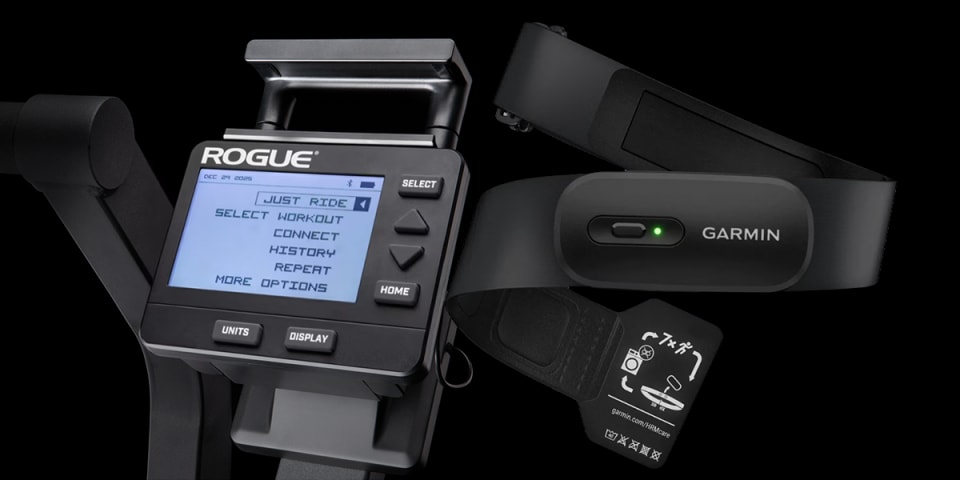
A compatible Heart Rate Monitor (HRM) can be paired as a sensor to the M2 monitor to display real-time heart rate data during your workout.
Follow these steps to sync your chest strap or armband HRM to the M2 Monitor:
- Confirm Compatibility The Rogue M2 Monitor is compatible with both Bluetooth and ANT+ heart rate monitors. This includes most modern chest straps (like the Polar H10 or Garmin HRM-Pro) and optical armbands. Note: If you are unsure of your model, please see more details on compatible HRMs below.
- Prepare the HRM Put on your heart rate monitor. If you are using a chest strap, it is recommended to wet the electrode pads with water to ensure a strong electrical contact with your skin.
- Power on the M2 Monitor Select the HOME button to wake up the M2 Monitor.
- Navigate to Pairing MenuOn the M2 Main Menu, select Connect.
Use the Down Arrow to highlight Connect Heart Rate, then press Select. - Scan for Device The M2 will begin scanning for nearby Bluetooth and ANT+ signals. This process can take up to 10 seconds.
- Select Your Device Once found, the name or ID of your HRM will appear on the M2 screen. Highlight your device and push Select.
- Confirm Data Your current heart rate (BPM) will be displayed on the screen. Push Select once more to confirm the selection.
- Start Your Workout Push the Home button once to return to the main menu. From there, select your desired workout mode. Your heart rate will now stay visible on the console throughout your session.
M2 Firmware Compatibility
This feature is supported on all firmware versions of the M2 Monitor. The M2 Monitor is designed to work seamlessly with the Rogue Echo Bike, Echo Rower and Echo SKI. For the best experience, ensure your monitor is running the latest firmware.
Heart Rate Monitor (HRM) Compatibility
The Rogue M2 Monitor is compatible with both Bluetooth and ANT+ heart rate monitors.
- ANT+: Best for stable, low-interference connection.
- Bluetooth Low Energy (BLE): Standard for most modern wearable sensors.
Recommended Heart Rate Monitors:
Garmin HRM 200
Polar H10
Garmin HRM-FIT
Troubleshooting Tips
- No Signal: Ensure the HRM strap is tight enough against the skin and the electrodes are sufficiently moist.
- Device Not Found: Check that your HRM is not currently “locked” to another app or device (like a phone or tablet), as some older Bluetooth monitors only allow one connection at a time.
- Battery: If the M2 fails to find the sensor after several attempts, the battery in the HRM strap may need replacement.